
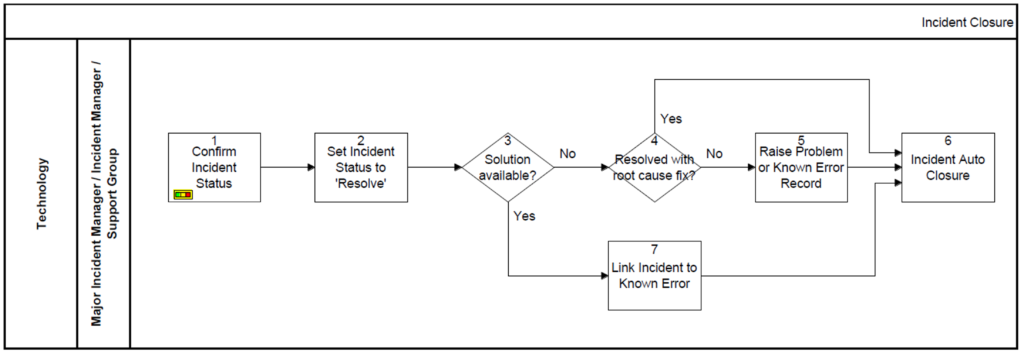
1. The The Major Incident Manager, Incident Manager or Support Group confirms with the user that the incident has been resolved. At this stage the incident is ready to be resolved.
 |  |
| CI | RA |
2. Following the confirmation of the satisfactory resolution of the incident the status is updated. The incident status is set to resolve.
| |
| CI | RA |
3. The decision is taken if a solution is available. The Known error database is reviewed and an appropriate Known Error is located. If the answer is yes, proceed to step 7) or if the answer is no proceed to step 4).
| |
| CI | RA |
4. A decision is that there is no solution available. We figure out if it can be resolved with a Root Cause Fix. We check to see if the root cause of the underlying problem addressed during the incident lifecycle. If the answer is yes we proceed to step 6) and if not proceed to step 5).
| |
| CI | RA |
5. If the root cause of the Underlying problem was not addressed during the incident; a) A Problem record is to be raised to identify root cause (where not known) and b) A known error is to be raised where a temporary work-around or a permanent solution has been identified. A Problem or a known error record is raised.
| |
| CI | RA |
6. At this stage there are three possible decisions. a) A solution is available b) Resolved with a Root Cause Fix c) Problem or Known error record raised. A Valid Problem record or a known error record is raised and linked to the Incident and the Incident is closed.
| |
| CI | RA |
7. The incident is linked to the appropriate Known Error record within the service management tool. The incident is closed.
| |
| CI | RA |
Authored by Vijay Chander – All rights reserved – 2023

Comments are closed